








WhatsApp introduced Business-Scoped User IDs (BSUID) in WhatsApp API webhooks on March 31, 2026, transitioning away from phone number-based user identification.
With usernames launching in June 2026, businesses must adapt to continue tracking customer identities.
This blog explains what's changing, its impact on your WhatsApp customer data and what to do before June 2026 to maintain business continuity.
Is your business affected by WhatsApp username 2026 update?
- You use WhatsApp phone numbers to match customers in your CRM → Yes, act now
- Your WhatsApp chatbot flows use phone number as the customer identifier → Yes, act now
- You only use WhatsApp for OTP authentication → No, you're unaffected
- You've already added BSUID to your WhatsApp API backend → No, you're covered
WhatsApp Usernames And BSUID Update: What’s Actually Changing
WhatsApp has always been built around phone numbers. Your unique phone number is your identity on the platform. Starting June 2026, users will be able to create a WhatsApp username (for instance, @firstname_lastname) and choose to message businesses without revealing their phone number.
This is one of the most-requested features on WhatsApp, and it mirrors how identities work on other messaging apps like Telegram, Instagram, and Signal. Although WhatsApp usernames are optional, they offer users more privacy and control.
For businesses, this means phone numbers may not always be visible for inbound messages. For such users, Meta is introducing a new field, Business-Scoped User ID (BSUID). So, how does BSUID ensure customer privacy while maintaining customer identities for businesses?
WhatsApp Usernames Explained
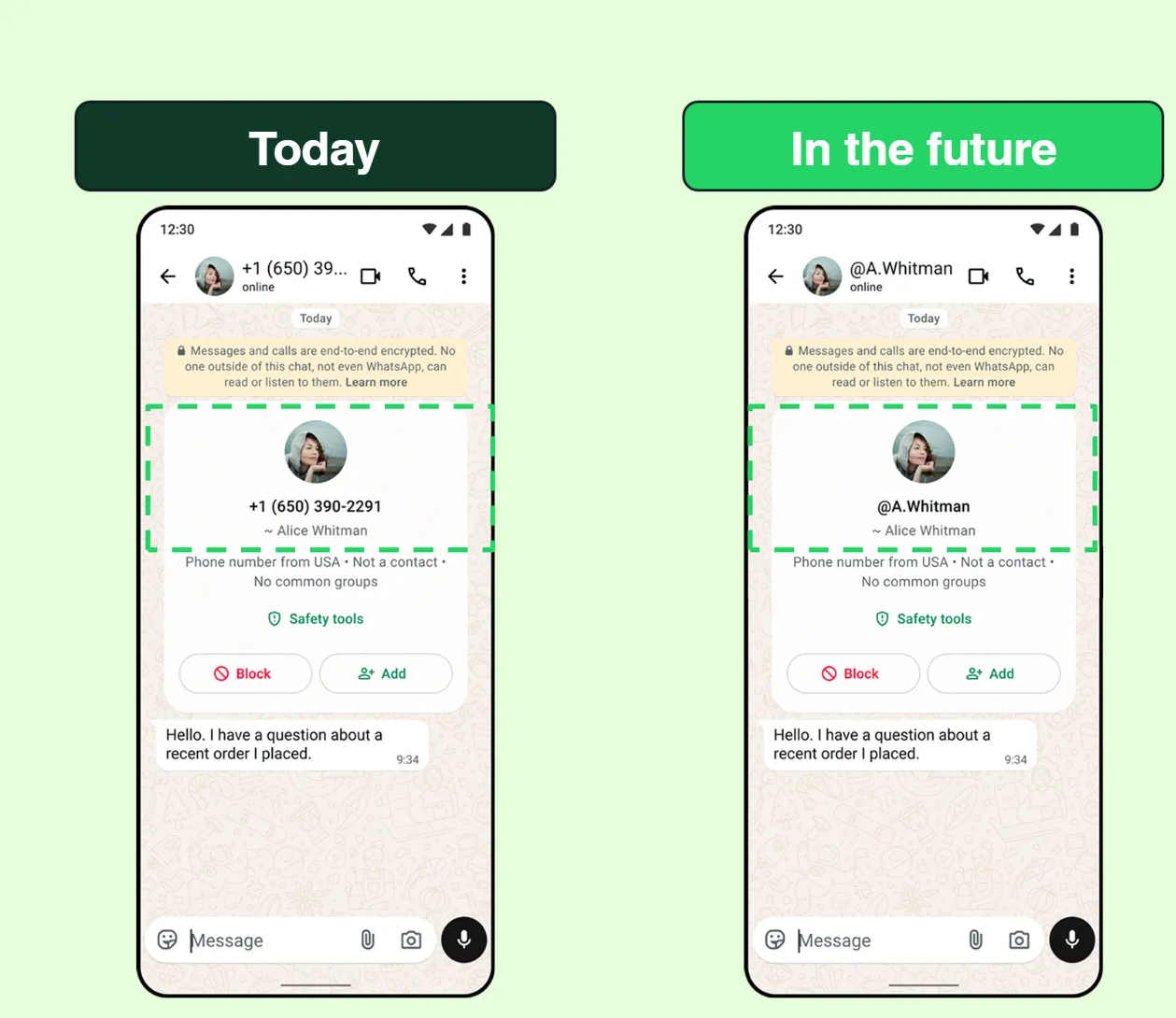
A Business-Scoped User ID (BSUID) is a unique identifier that Meta assigns to each WhatsApp user, specifically for your business. This unique user–business pair tells your system who is messaging you, without exposing their personal number.
Three important things to understand about BSUID before we dive in:
- It is unique per business, so individuals will have a different BSUID for every business they interact with on WhatsApp.
- It appears in all message webhooks from March 31, 2026, whether or not the user has adopted a username
- It introduces a new "user_id" field in the webhook payload uniquely identifies a user-business interaction along with the phone number when available
The key distinction is that user_id, representing the unique user interacting with the business, will always be present, while the phone number may not be visible if a user adopts a username. This is what most businesses have missed.
Moreover, brands can adopt a business username on WhatsApp, allowing users to search and reach them directly using an exact handle (e.g. @MyOperator). Unlike display names, which are not searchable, business usernames act as a unique and reliable identifier, making it easier for users to find your business.
Business usernames must follow specific formatting rules and are unique per account. For example, @MyOperator and @MyOperatorSupport would each map to different phone numbers. Importantly, even if a business adopts a username, its phone number remains visible to users.
Coming back to WhatsApp usernames for customers, here’s how the newly introduced BSUID field changes your WhatsApp data.
What Do BSUID June 2026 Changes Mean For Businesses?
The latest WhatsApp BSUID updates are not just technical changes. They change how businesses identify, track, and communicate with customers as WhatsApp usernames roll out.
Going forward, phone numbers will no longer be the only reliable customer identifier. Businesses should start treating the Business-Scoped User ID (BSUID) as the primary identity for CRM records, chatbots, and conversation history while storing phone numbers whenever available.
For most businesses, nothing changes in how customers interact with you. However, WhatsApp-depdendent systems that rely only on phone numbers risk broken customer records, duplicate contacts, and fragmented conversation history for users who adopt WhatsApp usernames.
Before vs. After BSUID: What Changes With WhatsApp Usernames
One of the most common points of confusion with WhatsApp's introduction of usernames in 2026 is how it changes WhatsApp API data. Here's how the three identifiers differ:
Here’s how it might look in your WhatsApp webhook payload:
Current webhook (User without a username)
{
"from": "919876543210",
"wa_id": "919876543210",
"user_id": "IN.a1b2c3d4e5f6",
"type": "text",
"text": { "body": "Hello" }
}
After June 2026 (User with a username)
{
"from": "IN.a1b2c3d4e5f6",
"wa_id": " ",
"user_id": "IN.a1b2c3d4e5f6",
"type": "text",
"text": { "body": "Hello" }
}
For users with usernames, the "from" field will contain the BSUID instead of a phone number. For contacts who do not adopt a username, phone numbers will be shown first, followed by the unique business-user ID.
Note: Field names such as "wa_id" and "user_id" reflect Meta’s current webhook terminology, but exact payload structure may vary depending on your WhatsApp API provider.
Now, let's explore what has changed already and what's yet to come.
The BSUID Rollout Timeline: What's Already Live And What’s Coming In 2026
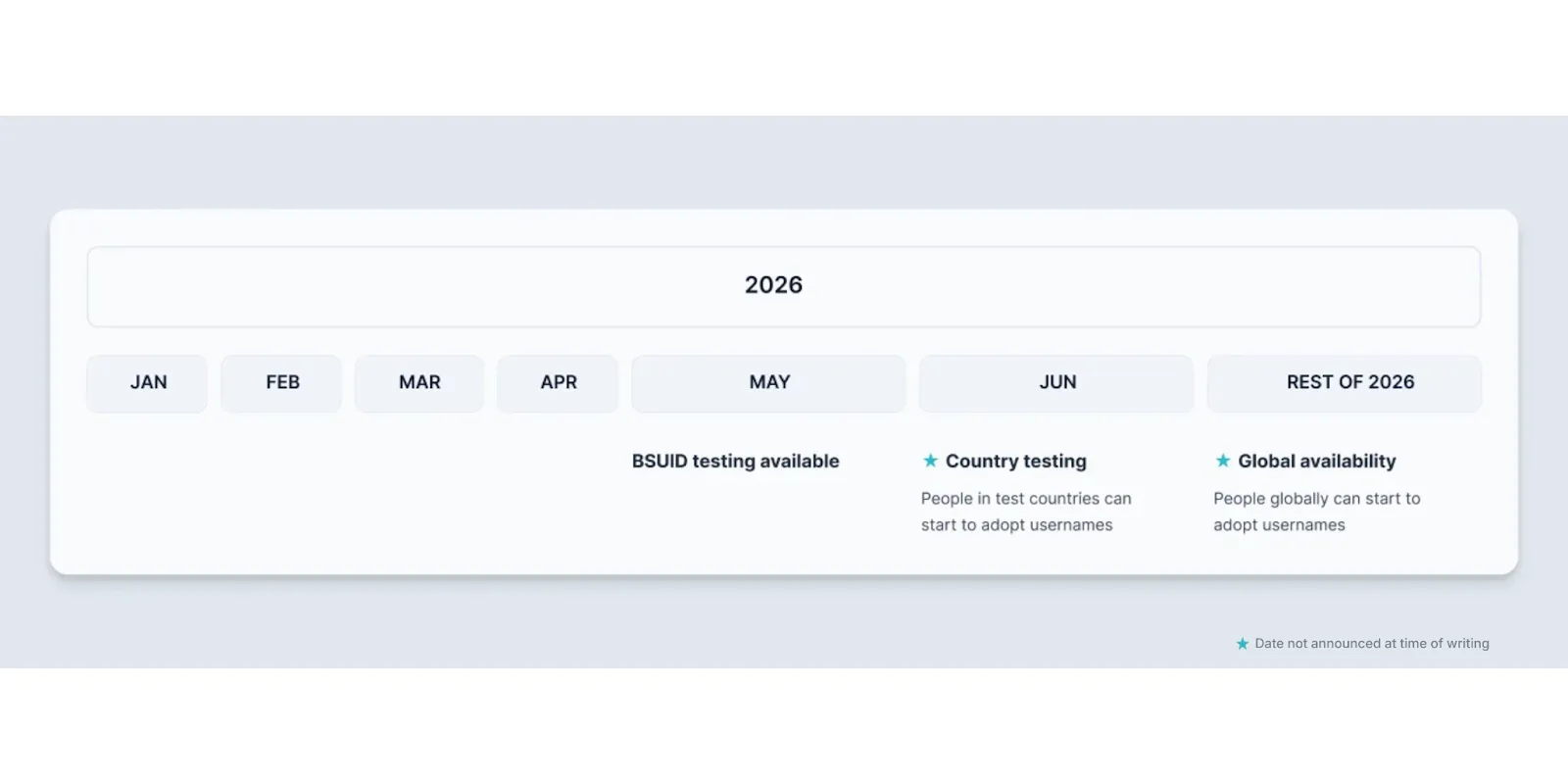
Meta first shared an official announcement on WhatsApp usernames in February 2026. Since then, it has updated the roadmap to include:
June 2026 Update: Meta Introduces New WhatsApp BSUID Capabilities
- Meta has added a "transfer_action" parameter for moving a WhatsApp business username between phone numbers within the same Business Portfolio to resolve the 147005 error code.
- New webhook payloads now include "from_user_id" and "from_parent_user_id" for edited and revoked messages for businesses using the WhatsApp Business app.
- The contact request API has been renamed from "contact_request" to "request_contact_info," allowing users to share their WhatsApp phone number with businesses.
- Businesses transitioning to BSUID should store Business-Scoped User IDs alongside the users' phone numbers rather than treating phone numbers as the primary customer identifier.
Key Takeaway For WhatsApp BSUID Timeline
BSUID is already live in your WhatsApp API webhooks. Username rollout begins in June 2026, after which some users may stop sharing phone numbers.
If your systems aren't updated by then, here’s what will break.
What Breaks in Your Chatbot, Campaigns, And CRM When Users Adopt WhatsApp Usernames
Here's the exact business impact of WhatsApp’s username 2026 update:
CRM And Contact Records
CRMs often use phone numbers to identify and match inbound WhatsApp messages to customer profiles. When a customer with a username reaches out on WhatsApp, their phone number will be replaced with a user-business ID (BSUID). Your CRM won't recognize them and create a new contact.
Chatbots And Automated Workflows
WhatsApp chatbots managing conversations based on phone numbers will lose track if users switch to usernames. Even for simple tasks, such as checking active orders or replying to support tickets, the lack of a phone number will break the chatbot’s flow. WhatsApp has also introduced stricter enforcement on templates, which may block messaging temporarily.
.webp)
Lead Generation on WhatsApp
If your lead capture maps WhatsApp inquiries using phone numbers, username-adopting leads will fall through the gap. You will be unable to match them with existing contact data in your CRM, affecting how you follow up with such leads. This can break attribution, retargeting, lead follow-ups, and sales pipelines.
See why WhatsApp converts better than B2B lead forms →
WhatsApp Campaigns And Broadcasts
If your bulk WhatsApp campaigns rely on phone numbers, you need to handle BSUIDs for contacts that have adopted usernames as it affects retargeting, follow-up sequences, and re-engagement campaigns. WhatsApp now restricts excessive retries for failed messages on the WhatsApp Business Account (WABA), temporarily limiting your ability to send messages.
See If Your Current WhatsApp Setup Is Already BSUID-Ready →
Multiple Business Numbers
If you manage multiple business portfolios, you need a Meta-provided parent ID, as you cannot generate unique IDs for each WhatsApp Business Account. Only with a "parent_user_id" can you track the same user across all your business-linked portfolios.
Learn how top brands build trust with users across WhatsApp business portfolios →
With Meta removing daily messaging limits, you can now send up to 100,000 messages across all WhatsApp numbers. So, while your business can execute high-volume campaigns, BSUID compliance becomes even more critical, as many WhatsApp customers you reach out to might have usernames.
Before reacting, keep in mind that core aspects of WhatsApp remain unchanged. Here’s what you don’t need to worry about.
What Doesn't Change With WhatsApp's 2026 BSUID Update
Existing WhatsApp Customer Data
Meta is launching a Contact Book feature in early May 2026 to automatically store user phone numbers and BSUID pairs from prior interactions. Once a user is in your contact book, their phone number will continue to appear in webhooks, even if they later adopt a username.
Frequent Customer Interaction Data
WhatsApp automatically captures a user's phone number for a rolling 30-day period after any interaction between your business and the user. So even after usernames roll out, frequent customers will continue to appear in your webhooks with their phone numbers.
Even after the transition window ends, new users can securely share their phone numbers via WhatsApp. In this case, phone numbers will be displayed as a secondary identifier after BSUID.
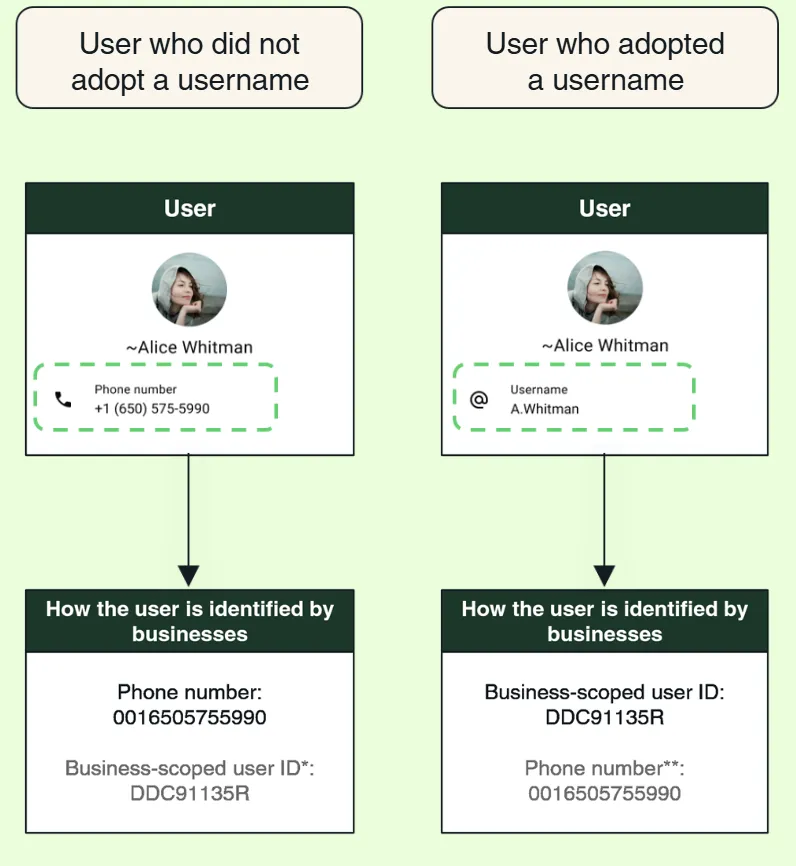
To summarize, here's what stays the same:
- Existing customers' phone numbers remain visible, and you can continue messaging them using the stored number, even if they adopt a username later.
- Existing conversations are unaffected as WhatsApp preserves contact history.
- Data of users who don’t adopt usernames will remain unaffected, and you will be able to see their phone number and BSUID.
- Authentication and OTP messages will still go directly to phone numbers.
- Your business phone number on WhatsApp remains visible to users even if you adopt a username.
The core customer experience on WhatsApp doesn't break.
However, when customers adopt usernames, their phone numbers may not be visible. If your WhatsApp system operates with phone numbers as the primary identifier, you must adapt right now to ensure your system is BSUID-compliant.
How To Prepare Your Business For WhatsApp Usernames? 3 Simple Steps To Adopt BSUID
Step 1: Audit And Test WhatsApp-Dependent Systems
List all systems that use WhatsApp phone numbers: CRM, helpdesk, chatbot, campaigns, analytics, and lead flows. These must support WhatsApp user IDs (BSUID) before June 2026.
Next, test webhook payloads for all possible scenarios:
- Users without a username: Webhook payload should include BSUID and phone number. This represents the default state for users before June 2026.
- User with a username (post-June): Webhook payloads will include the username and BSUID, but no phone number. This is where unaware businesses will see their WhatsApp flows break.
- Users in Contact Book (post-June): If your Meta contact book has captured a user’s phone number, webhook payloads should include username, BSUID, and phone number.
You can test webook payloads by navigating to App Dashboard > Use cases > Connect with customers through WhatsApp > Customize > Configuration panel > Test
In addition to identifier changes, you should also test account lifecycle events in webhooks. WhatsApp has introduced new disconnection reasons for clients using both the WhatsApp Business app and Cloud API, including:
- Account disconnected
- User changed number
- User re-registered
Step 2: Add BSUID Field To Your CRM (For WhatsApp Business API Integrations)
If your CRM already stores both phone numbers and BSUIDs, most of this transition happens behind the scenes. If it doesn't, customer records can break when users choose to communicate through WhatsApp usernames instead of sharing their phone numbers.
One of the most important updates is ensuring your CRM can store and use Business-Scoped User IDs (BSUIDs). With WhatsApp usernames, incoming messages may include a phone number, a BSUID, both, or neither. Here’s how your CRM should behave:

1. Read All Available Identifiers from Webhook
From incoming webhook payloads, extract:
- from → may contain phone number OR be empty
- BSUID / user_id → always contains BSUID
2. Normalize the Incoming Identity
Determine what identifiers are available:
- If from is present → use as phone number
- If from is empty → rely on BSUID (BSUID / user_id)
- If both are present → treat them as the same user
3. Contact Lookup Logic
Case A: Phone number available
- Search CRM using phone number
- If a match is found → attach BSUID to that contact
- If no match → create new contact with phone number & BSUID
Case B: Only BSUID available
- Search CRM using BSUID
- If a match is found → use the existing contact
- If no match → create new contact with BSUID as primary identifier
Case C: Both phone and BSUID available
- Search CRM using phone number
- Store BSUID alongside it
- Maintain mapping for BSUID-only interactions in the future
4. Maintain Identifier Mapping (Critical)
For every contact, store phone number (if available) and BSUID (mandatory).
This ensures that users can be identified when they adopt usernames and phone numbers are not available. Meta supports this via
- Contact Book feature (stores phone + BSUID pairs)
- Dual-field availability in WhatsApp webhooks (BSUID is always present)
With new webhook signals for account changes, your CRM must handle users changing their phone numbers and users re-registering on new devices, too.
5. Update Messaging Logic
With WhatsApp usernames, phone numbers may not be available for all users. Ensure your system supports both identifiers for outbound messaging.
- If a user has a phone number → send using the phone number
- If a user is BSUID-only → send using BSUID
6. Handle Edge Cases (What Most Teams Miss)
You must account for:
- from field being empty or null (username-adopting users)
- Phone number missing
- The same user with different BSUIDs across different business portfolios
Since BSUID is always present, you should treat it as the primary identifier. Phone number availability is conditional and should not be relied on for long-term identity mapping on WhatsApp.
Step 3: Claim Your Business Username on WhatsApp
Meta will soon allow businesses with WhatsApp Business Accounts to claim usernames based on their existing display names on WhatsApp, Meta Business Suite, or Facebook/Instagram. Like any social media handle, brand usernames will be claimed on a first-come basis, so you should apply for one as early as the feature rolls out.
How MyOperator Handles WhatsApp Business Updates For You
MyOperator is an official Meta Business Partner, so platform-level WhatsApp updates are handled on our end, not yours.
If you are running WhatsApp on the MyOperator platform, including AI Chatbot, WhatsApp Business API, Multi-Agent Chat, or CTWA, we can help you ensure:
- Existing customer conversations stay intact
- New username-based contacts are captured
- WhatsApp chatbots and AI agents work seamlessly
Explore MyOperator's WhatsApp Marketing Suite →
The Bottom Line: WhatsApp BSUID is The New Primary Customer Identifier
WhatsApp is moving toward a privacy-first identity model. Phone numbers aren't disappearing completely, but they are no longer guaranteed as the primary identifier.
With BSUID live as of March 31, 2026, and usernames rolling out in June 2026, businesses that act in April and May will see zero disruption. The ones that don't risk losing contact records, breaking chatbot flows, and missing lead follow-ups on WhatsApp.
If WhatsApp is part of your customer communication stack, start with the three steps outlined above today. We’re committed to sharing latest updates from Meta to help you stay ahead of the shift.
.webp)
.avif)



.webp)


