







Introduction
The MyOperator Chrome Extension is a powerful tool that allows users to initiate calls directly from the web browser. This extension simplifies the calling process and provides a seamless experience for both outgoing and incoming calls.
Benefits:
- Integration with CRM: MyOperator Chrome Extension offers a seamless and integrated calling experience directly within any CRM of your choice, eliminating the need for manual Excel sheet entries or external phone systems.
- Live call notification: You receive notifications for incoming calls, ensuring that you never miss an important call, and a simple click redirects you to the web call window to answer the call promptly.
- Initiate Calls Easily: The extension automatically identifies phone numbers on every webpage and appends a call icon beside each number. Auto-detection of phone numbers saves users time and effort by eliminating the need to manually input or copy-paste numbers. It also reduces the risk of manual input errors or calling the wrong number.
- Accessibility: With this extension, you can make and receive calls from any location with an internet connection, increasing accessibility and remote work capabilities.
- Track previous conversations: Before initiating the call, read all the previous notes to facilitate a more informed and effective conversation.
1. Installation
- To install the extension, open Google Chrome and visit the Chrome Web Store.
- Search for "MyOperator Click to Call" or install it from here. https://chrome.google.com/webstore/detail/myoperator-click-to-call/hnlocbghekoeogmbhhphhpjldbipmnhd
- Click on the "Add to Chrome" button next to the extension.
- Once it is added, go to Extension and pin the MyOperator Extension

2. Setting up Your Account
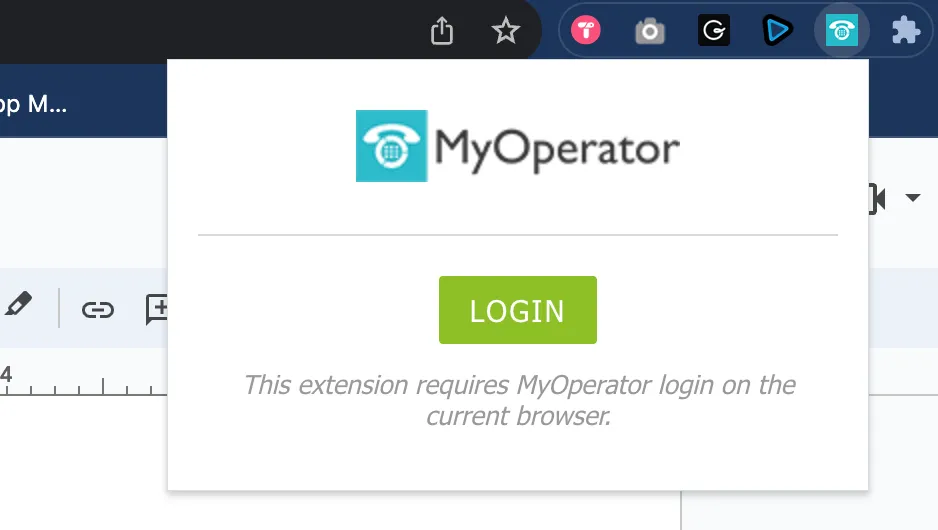
- After installing the extension, click on the MyOperator icon in the Chrome toolbar.
- Sign in using your MyOperator account credentials or create a new account if you don't have one.
3. Auto Detection of phone numbers
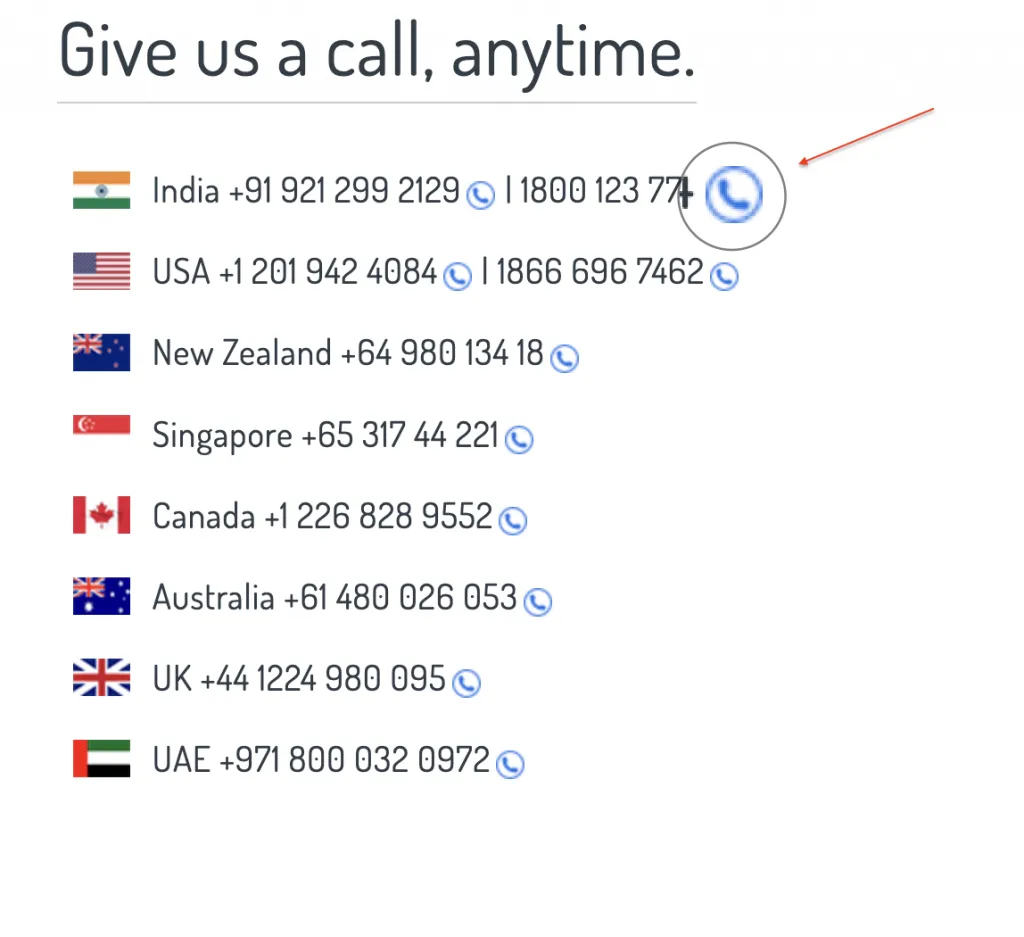
- The extension automatically identifies phone numbers on every webpage and appends a call icon beside each number.
- Simply clicking the call icon will open the web window to initiate the call.
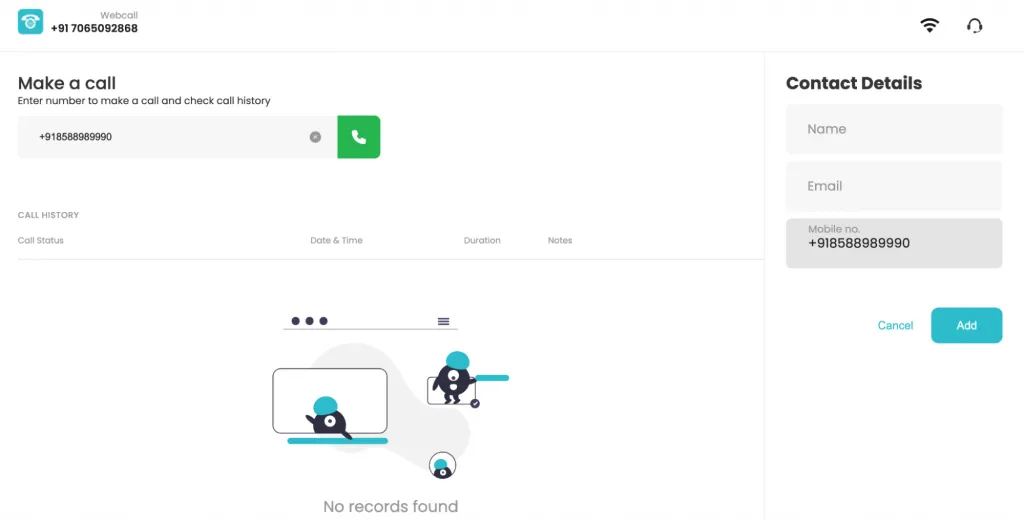
4. Making Outgoing Calls
- To initiate a Call, click on the MyOperator icon in the Chrome toolbar to open the extension.
- Enter the recipient's phone number and click the "Call" button.
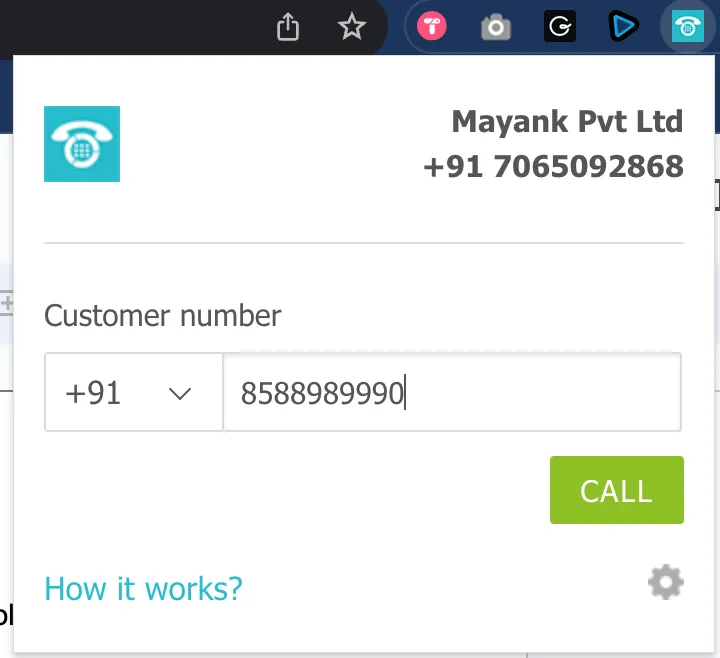
- The webcall window will open with the prefilled number and hit the call button to initiate the call
5. Receiving Incoming Calls
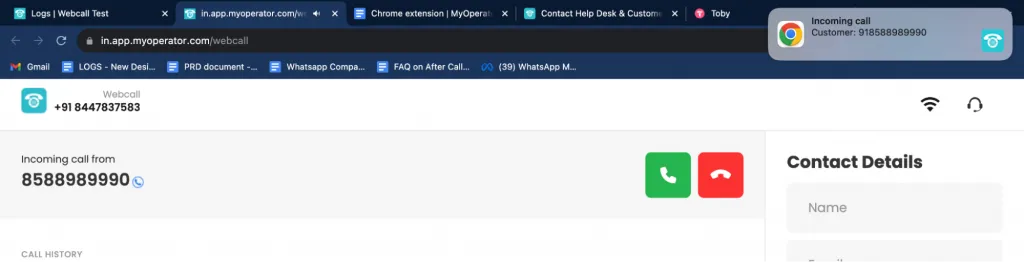
- When someone calls you, you'll receive a notification in your Chrome browser.
- Clicking on the notification will redirect the user to the Webcall window to answer the call.
Recording: https://drive.google.com/file/d/1Mo1V2Cusw8Mv66SfwjyIpo5czomLvIxa/view?usp=share_link
6. Settings and Configuration
You can customize the extension's settings by clicking on the MyOperator icon in the Chrome toolbar and selecting "Settings." Here, you can find the following settings:
6.1 PAUSE auto-detection of a phone number on any webpage
This feature is particularly advantageous for CRM integrations. It automatically identifies phone numbers within your CRM and places a call icon next to each number. You can simply click on the call icon to initiate a call directly from your CRM.
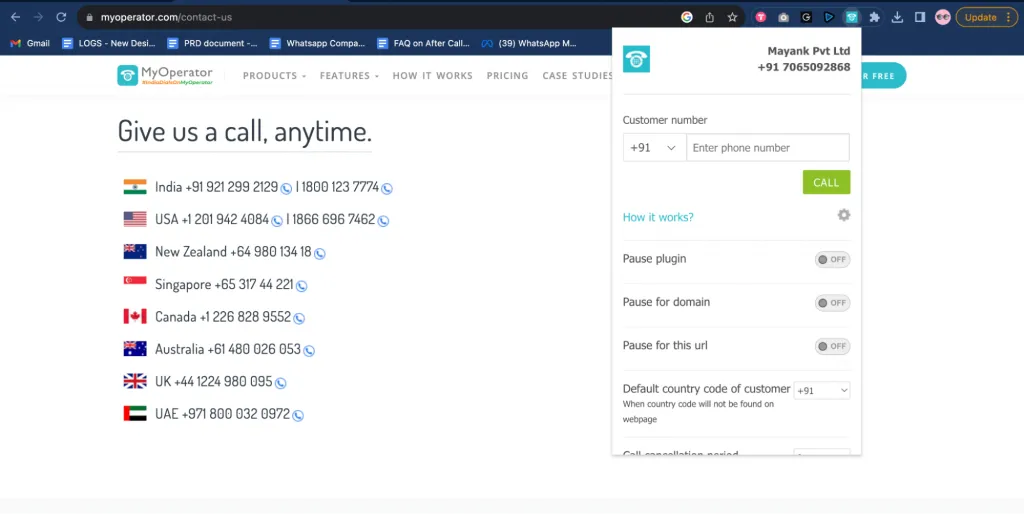
- Pause Plugin: It is disabled by default. Enabling it will stop the automatic detection of phone numbers and the addition of a call icon next to the number on all web pages.
- Pause for Domain: By default, this setting is disabled. You can choose to pause the auto-detection of phone numbers and call icon insertion for a particular domain. For instance, if you want to disable it for "www.myoperator.com", it will stop detecting numbers across the entire myoperator domain.
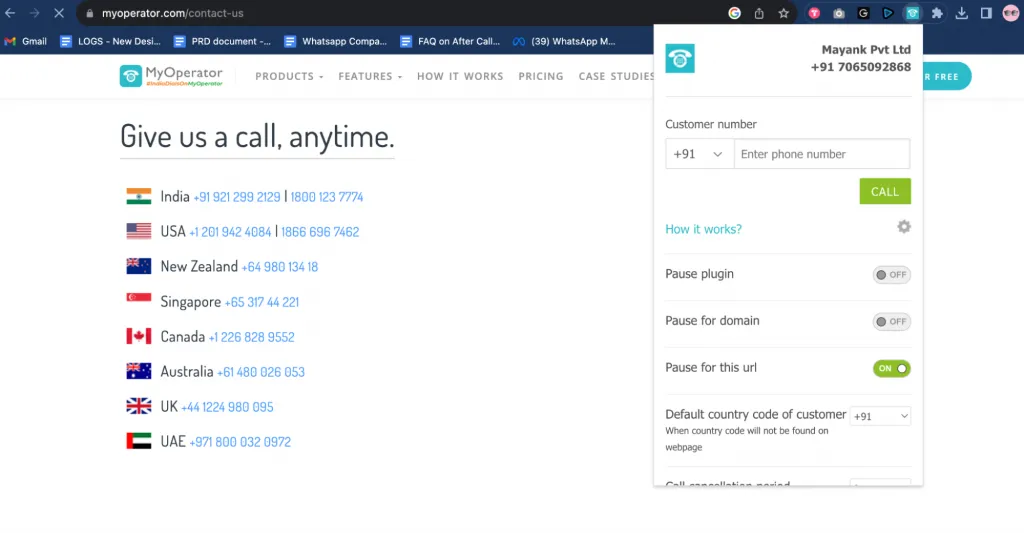
- Pause for this URL: This setting is also initially disabled. You can stop the auto-detection of phone numbers and the addition of call icons for a specific URL. For example, on the "https://myoperator.com/contact-us" page, it will not detect numbers, while for the rest of the MyOperator domain, it will continue to function.
How to use it?
When it is disabled, it will detect and add call icon next to the phone number.
When it is enabled, it will stop detecting the numbers and remove the call icon too.
6.2. Default country code of customer
It is set as +91 for Webcall India and we do not support international outgoing from our Indian DID numbers. To make international calls, use the International account.
6.3 Call cancellation period
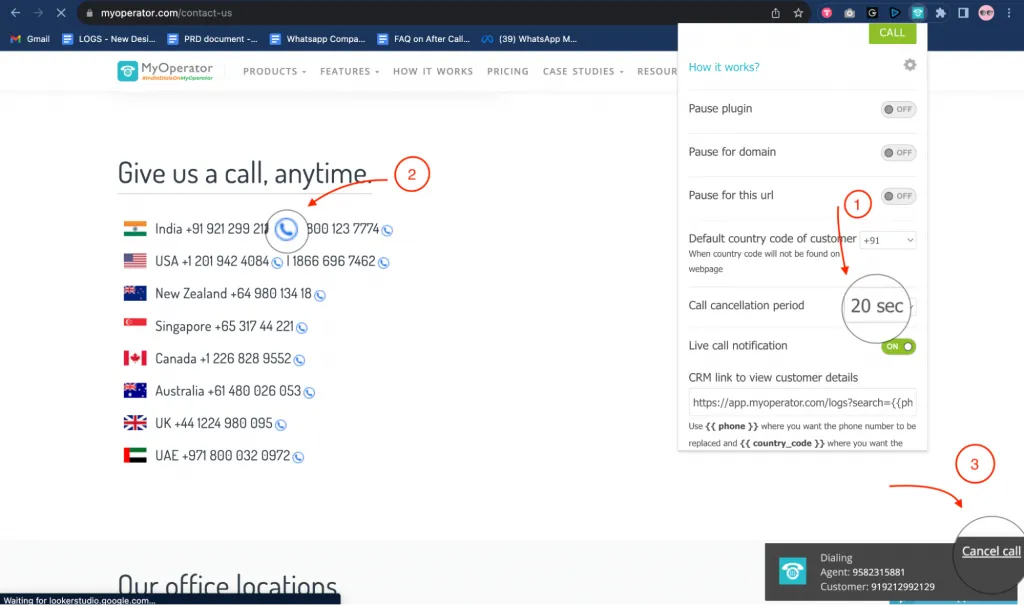
The call cancellation period allows you to cancel the call if you have accidentally initiated the call. The default call cancellation period is set to 0 sec, but you can increase it up to 30 seconds.
For example, I have set the call cancellation period to 20 seconds and when I click on the call icon next to the number 9212992129, a notification will start to appear at the bottom, allowing you to cancel the call within 20 seconds window. After 20 seconds the call will initiate automatically.
6.4 Live Call Notification
To receive the real-time incoming call notification, you can enable the live call notification. It is turned on by default. Some of the benefits of live call notifications:
1. Prompt Response: Incoming call notifications ensure you are immediately aware of incoming calls, allowing you to respond promptly.
2. No Missed Calls: You're less likely to miss important calls, ensuring you can address them in a timely manner.
3. Enhanced Productivity: Reduces the need to constantly monitor calls, enabling you to focus on other tasks until a call arrives.
6.5 CRM link to view customer details
You can use this functionality to search for a contact based on their phone number. If you wish to access the historical conversations of a client, use the following link and substitute {{phone}} with the customer's phone number. For instance, if you want to review the call history and recordings of your client with the phone number 8588989990 on MyOperator, you can replace {{phone}} with 8588989990 in the URL and paste it into the address bar to access the historical records.

Similarly, you can replace the default URL with your CRM url to search by phone number.
6.6 Re-Sync Account
If you have changed the permission of the User/Agent from Click to Call mobile to webcall or from webcall to click to call mobile. Use Re-sync button to change the chrome extension settings as per current permission.
Conclusion
The MyOperator Chrome Extension simplifies call management and provides a smooth integration with any CRM, allowing you to initiate and receive calls directly from your web browser along with the live call notification. By following the steps outlined in this training document, you'll be able to set up and use the extension effectively, enhancing your communication capabilities.
Please note that for successful CRM integration, three primary components are essential:
- Click to Call from CRM: This feature places a call button next to every phone number, facilitating calls within the CRM.
- Live Call Notifications: Incoming call notifications keep you informed in real-time.
- Post-Call Actions: After a call ends, it should create a new lead if the number is associated with a new customer or an activity under the lead if one already exists for that number.
The Chrome extension effectively addresses the first two requirements. To tackle the third aspect, which involves post-call actions, an after-call webhook is necessary. This solution remains compatible with all existing CRM integrations, ensuring a smooth and efficient workflow.
Need Help with MyOperator Chrome Extension Installation?
Contact us at hello@myoperator.com. We're always here to help :)
.avif)



.webp)


